

Hello,
Clic Santé will roll out an update across all of its applications designed to secure the appointment-scheduling process and ensure the integrity of the care provided to the public.
What you'll be asked when you log in
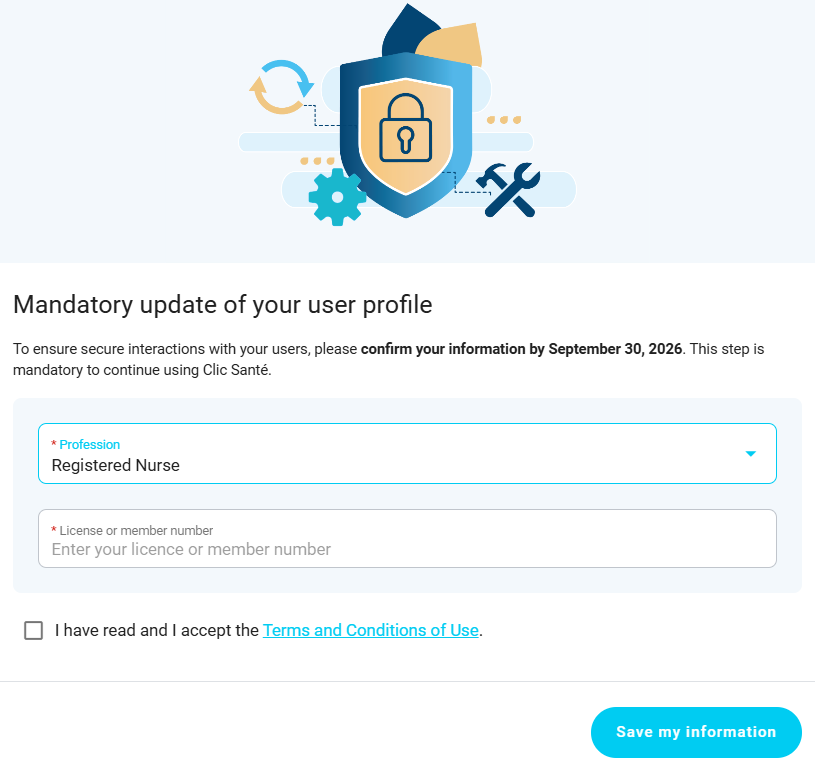
A dedicated page will appear automatically and prompt you to fill in the following information:
- Your profession: Select it directly from a drop-down menu.
- Your license number: The field will automatically adjust based on the profession you select so that you can enter your license number (professional association) or membership number (recognized association).
- Acceptance of the updated Terms of Use.
Why is this approach essential?
This development is at the very heart of our mission: in collaboration with the Quebec Interprofessional Council and the professional orders that work with us to refer users to the right professional or qualified practitioner.
- Ensuring a Safe Path: We verify that every professional holds a valid license to practice from their professional association. This ensures that users have access to services and care that are provided competently, ethically, and reliably.
- Professional and Title Compliance: Ensure that each professional or practitioner is classified in the correct practice category, avoiding any confusion regarding roles and strictly adhering to reserved titles.
If you have any questions or are having trouble finding your profession in the list provided, our technical support team is available at support@clicsante.ca.
The Clic Santé Team
| By phone | Solutions home page | Get help and open a ticket |
| 450-977-2672 poste 2 | Solutions Clic Santé | Open a ticket |

Trimoz Technologies - All rights reserved